
Turn a Buildertrend estimate into a proposal.
Keep pricing in Buildertrend. Print the estimate to PDF and send it to me. It comes back as a proposal a homeowner can read.
Before
This is the first page of a real Buildertrend estimate for a garage turned into an ADU. The names and address are changed. The lines and prices aren't.
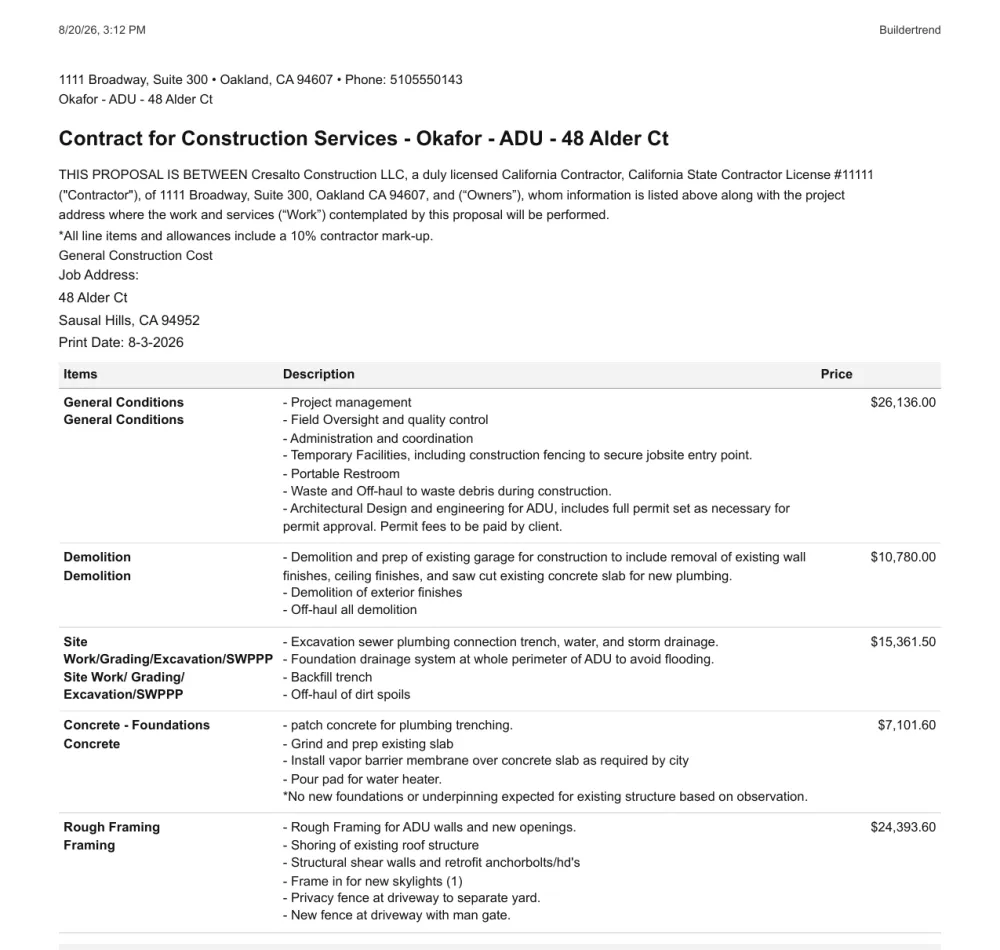
It's all correct. But it's written for the people doing the work. The homeowner reads contract language first, then about 20 lines of trade terms. There are no photos. What isn't included is in the middle of a paragraph on page 3.
After
The same job, as a proposal. See every section.

What stays the same
- Every line description, word for word.
- Every price. The total is $265,262.25 in both.
- Your allowances, listed as allowances.
What changes
- The job in plain words goes at the top.
- Lines are grouped under trades a homeowner knows, with a subtotal for each.
- Photos of finished jobs like this one.
- What isn't in the price, right next to the price.
- It opens as a web page on their phone. There's still a PDF button.
How to send it
In Buildertrend, print the estimate or proposal to PDF, the same way you would to email it. Send me that file. You don't have to export anything else or connect your account.
Building ADUs? See what an ADU proposal should include.
Buildertrend is a trademark of its owner. Finishwork isn't connected to Buildertrend.